
Neveshte is where you write your YouTube scripts. It learns how you talk from your own channel, then walks you through each script one step at a time: it asks before it writes, and you approve each stage. Here is the path, and where to read more about each part.
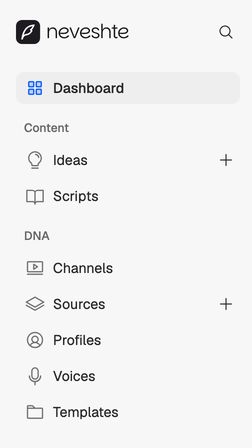
The sidebar follows the same path. Dashboard shows what’s waiting on you, Content holds your ideas and scripts, and DNA holds what every script draws on.
1. Creator DNA
Your Creator DNA is what every script starts from. It lives under DNA in the sidebar:
- Channels. Your YouTube channel, read once by channel setup.
- Sources. Public videos you learn from. Paste a link and import a profile, a voice, a template or ideas from it. See Learn from any public video.
- Profiles. Who you are, who you make videos for and what you believe. See Edit your creator profile.
- Voices. How you talk: your speed, your sentence length and the phrases you use. See Tune your voice.
- Templates. The shapes your videos take, section by section. See Templates.
Channel setup drafts a profile, a voice and starter templates from your videos, and costs no credits. No channel yet? You can still start.
2. Ideas
Keep video ideas in Ideas until you’re ready to write them. Capture them yourself, generate a few from your channel or pull them out of any public video. See Capture an idea.
3. Compose
A new script goes through four steps:
- Brief. It asks a few questions to pin down the angle and the audience. See Answer the brief.
- Research. Optional. It finds sources and you keep the ones you trust. See Research and sources.
- Outline. You shape the sections and how long each one runs. See Shape the outline.
- Write. It drafts the script in your voice. See The Write step.
4. Edit, record and share
The draft opens in the editor as sections you can move, rewrite and retype. The assistant answers questions about the script and suggests edits you Apply or Dismiss. See Find your way around the editor and Edit with the assistant.
When it’s ready, read it from the teleprompter, or send a read-only share link to your editor or to your phone.