
The Getting started card at the bottom of the sidebar tracks six steps from an empty workspace to your first script. It shows how many you’ve done and names the next one. Click it to see all six and jump to any of them.
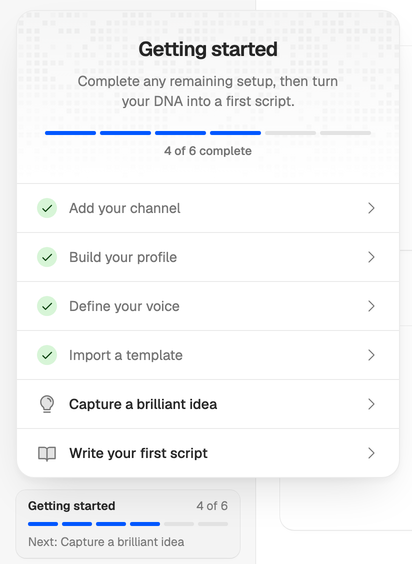
The six steps
| Step | Done when | Takes you to |
|---|---|---|
| Add your channel | Channel setup finishes, or a setup step fails and you choose Skip setup or Finish without competitors. Adding the channel alone doesn’t count. | Channels |
| Build your profile | Your workspace has at least one profile. | Profiles |
| Define your voice | Your workspace has at least one voice. | Voices |
| Import a template | Your workspace has at least one template, from channel setup, the library, a link or built by hand. | Templates |
| Capture a brilliant idea | Your workspace has at least one idea. | A new idea |
| Write your first script | Your workspace has at least one script. | A new script |
If channel setup runs all the way through, it ticks off the first four for you, because it drafts a profile, a voice and starter templates.
How it behaves
- You can do the steps in any order. The bar fills by how many are done, and Next always names the first one in the list that isn’t.
- The checklist belongs to the workspace, not to you. Everyone in it sees the same progress.
- It counts what’s in the workspace now, so deleting your only idea unticks that step again.
- Once all six are done, the card disappears. It’s also hidden while the sidebar is collapsed.
The dashboard’s Get set up list
Until your Creator DNA is complete, the dashboard shows a shorter list, Get set up, with the first four steps under other names: Connect your channel, Describe your audience, Capture your voice and Pick a script structure. They tick off the same way as on the card. The next one has a button, such as See channel setup while setup is still reading your channel.
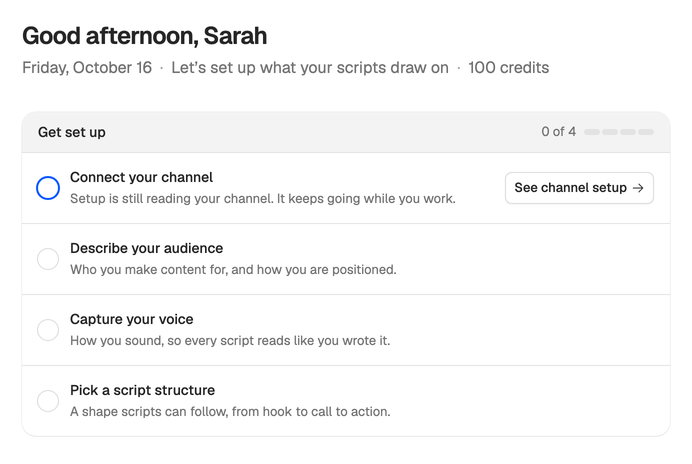
Once all four are done, the list goes and the dashboard shows your Creator DNA instead.
Where to start
Most people go top to bottom: set up your channel, read what it drafted, capture an idea, then write your first script. No channel? Build your DNA another way.