
Research is the optional step between the brief and the outline, and it costs 2 credits. Neveshte searches the web for figures, examples and counterpoints on your topic, then lets you choose which sources reach the script. Anything you leave out is ignored.
Set it up
The step opens on a choice. The switch turns research on or off (it starts the way you left Research on the new script page), and the panel says Research recommended when the brief leans on facts, numbers or recent events.
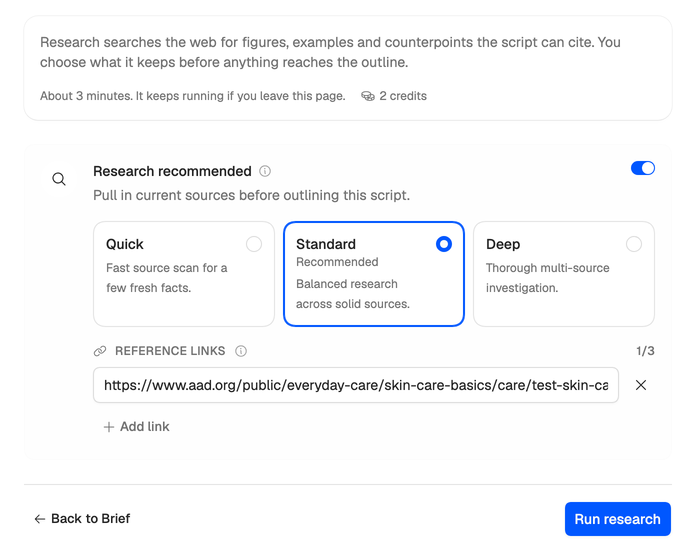
- Pick a depth. Quick reads about 3 sources, Standard about 5 and Deep about 8. Neveshte marks one Recommended. If it has already picked for you, you see its choice on one line instead: choose Change to pick another.
- Under Reference links, choose Add link to add up to three URLs of your own. They’re required reading, so use them for the article, study or video your script has to cover. Links you pasted into your prompt are already here.
- Press Run research. Or turn the switch off and press Continue without research to go straight to the outline.
Every depth costs the same 2 credits. Deeper research takes longer and gives you more to choose from. A run takes about three minutes and keeps going if you leave the page. While it runs you see three stages: Planning queries, Searching sources and Extracting insights.
Stop research stops the whole compose run, not only this step, so it asks you to confirm first.
Keep what you trust
When research finishes, you see every source it found, all included to start with. Each shows its strongest finding, how relevant it is and the site it’s from. Links you added are marked Added by you.
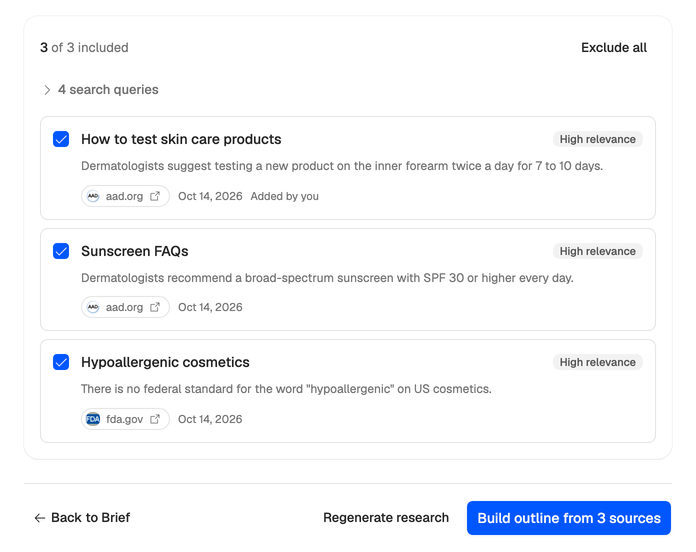
- Untick any source you don’t trust, or use Exclude all and Include all.
- Press Build outline from 3 sources (the number follows what you kept), or Build outline without sources if you excluded them all.
Only the sources you keep, and the findings in them, go into the outline and the draft. The Write step checks that the draft states them as their sources do, but checking accuracy before you record is still your call.
Come back to the step later and it lists the findings you kept, sorted into Hooks, Proof points, Counterpoints and Examples.
When nothing comes back
If nothing usable comes back, the step says No usable sources. Press Continue without research to build the outline from the brief alone, or Regenerate research to run the same search again (2 credits).
To try again with links that cover the topic, regenerate the brief (1 credit), answer its questions again, and add the links under Reference links when research comes round.
Next: Shape the outline.