
The Brief is the first step of compose, and it costs 1 credit. Before writing a word, Neveshte reads your prompt (and your idea, if you started from one) and asks what it needs to know: who the video is for, what angle to take, what viewers should remember. Your answers become the brief every later step works from.
Answer the questions
The questions come one at a time, in up to three rounds, and your answers save as you go.
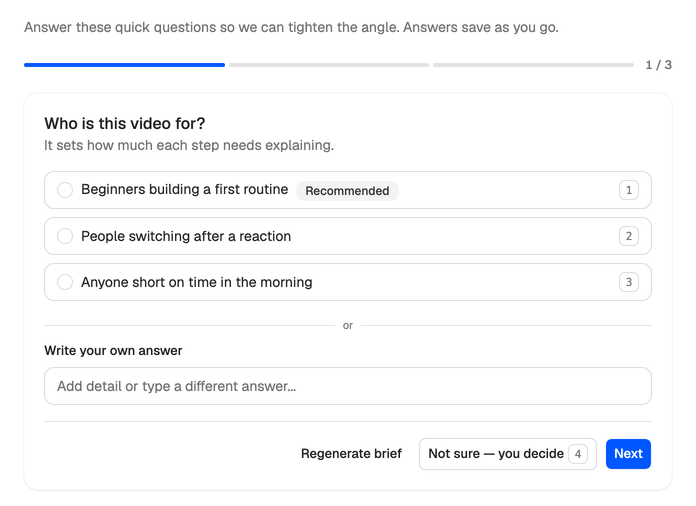
For each question, either:
- Pick an answer. One is marked Recommended: the best guess from your prompt and your Creator DNA, and a fine default when you’re unsure. Some questions take more than one answer. The number keys pick answers too.
- Type your own under Write your own answer, to add detail or answer differently.
- Choose Not sure and let Neveshte decide.
Next moves on, Back goes to the previous question, and Save sends the round. A second round only comes when your answers raise something worth confirming. A detailed prompt usually means fewer questions, and sometimes none at all.
Review and edit the brief
After the last round you see the brief itself, and every field can be edited:
- Topic: what the video is about.
- Angle: your take on it, the framing that makes it yours.
- Audience: who it’s for.
- Suggested Title: a working title. You can change it later in the editor.
- Key messages: the points the script must land. Choose Add for another, and hover one to remove it.
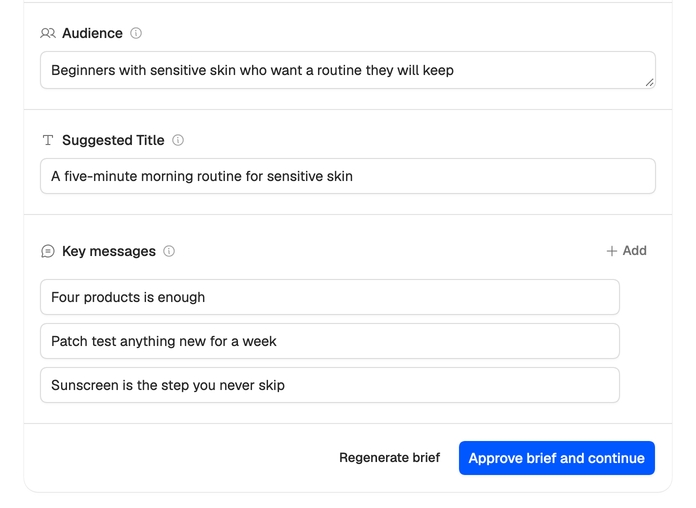
Read the key messages closely. Each one shapes a part of the outline, so this is the cheapest moment to change direction.
Continue
Press Approve brief and continue to move on to Research, where you choose whether to research at all.
Not happy with the brief as a whole? Regenerate brief runs the step again from the start, questions included, and spends its credit again.