
The Write step turns your approved outline into a full draft, then polishes it to sound like you. Writing costs 8 credits and polishing 4, so the draft only starts when the workspace has at least 12 credits. Nothing waits on you here: you can watch, or close the tab and come back.
The nine passes
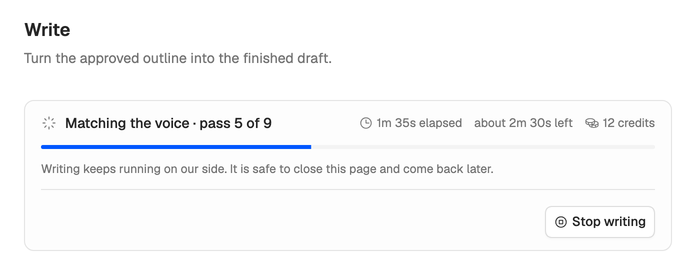
The draft goes through nine passes, in order. The step names the pass that’s running, with the time so far, a rough time left and what the draft costs.
- Choosing the hook. Writes an opening of each type and keeps the strongest.
- Writing sections. Writes each section to its length, at your voice’s speaking speed, and lists the words in each.
- Checking the research. Makes sure the draft uses the sources you kept, as they state them.
- Tightening retention. Re-hooks sections that only announce themselves and pays off promises the script made.
- Matching the voice. Brings sections back to your voice’s sentence length and takes out the phrases it avoids.
- Cutting repetition. Trims what the draft says twice.
- Checking the profile. Holds the draft to your profile’s audience, beliefs and rules.
- Quality checks. Checks the promise is delivered, every key point is covered and nothing reads as machine-written.
- Finalizing. Builds the version the editor opens.
A pass that has nothing to work with shows Skipped: checking the research when you skipped research, matching the voice without a voice, checking the profile without a profile.
Stop writing stops the whole compose run, so it asks you to confirm first.
When it’s done
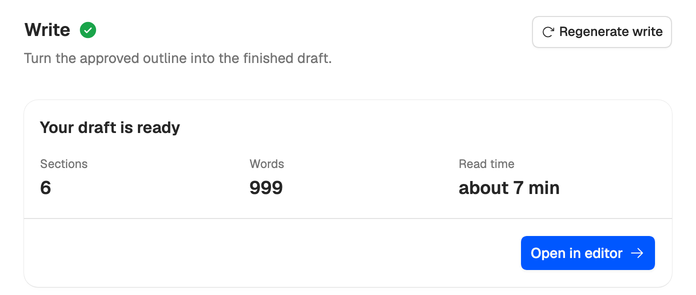
You see Your draft is ready, with its Sections, Words and Read time (worked out at a typical 150 words per minute). Press Open in editor to start your own pass. See Find your way around the editor.
If it stops
The step shows Write stopped with the reason. Retry write runs it again from the pass that stopped: if the sections were already written, they’re kept and only the remaining passes run. The failed pass’s credits are refunded, and running it again spends them once more. Polishing is charged at Finalizing, the last pass, so a polish pass that fails before it costs nothing. See A step failed or seems stuck.
If the workspace has fewer than 12 credits, the step stops before writing anything with Writing and polishing the draft needs 12 credits. Add credits, then run the draft again. See Out of credits.
Redo or cancel
- Regenerate write, at the top of the finished step, writes the draft again and replaces it. It spends the 12 credits again.
- Regenerating an earlier step (the brief, research or outline) replaces it and every step after it, and spends their credits again.
- Cancel compose, in the menu at the top right of compose, discards everything compose has produced. The idea you started from stays in your workspace, but credits spent on finished steps aren’t refunded.