
The Outline step turns your brief (and the sources you kept) into the shape of the video, section by section. It costs 2 credits. Nothing is written yet, so this is where structural changes are cheapest.
Read the sections
Each section is a card with its type (Hook, Context, Story, CTA and so on), its title, a line of summary and its length. The bar above the cards adds them up: how many sections, how long they run and roughly how many words that comes to.
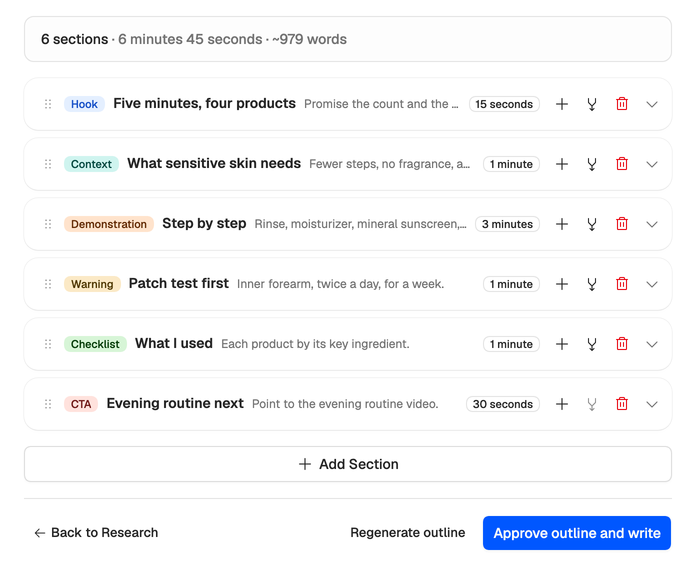
Open a card to read its full summary and key points.
If you chose a template, the outline follows it: the same sections, in the same order, with the same lengths. Without one, a long video gets four to eight sections and a Short one to three. Both include a hook, and a long video also gets a call to action.
Change it
- Drag a card by its handle to reorder it.
- The + on a card adds a section below it. Add Section at the bottom adds one of the type you pick.
- The merge button on a card joins it with the next one.
- The bin removes a section.
- Open a card and choose Edit to change its type, title, length (from 15 seconds to 5 minutes), summary or key points, then Save.
Press Save Changes to keep your edits without approving yet. To start over, Regenerate outline writes a new one and spends its 2 credits again.
How length becomes words
Section lengths are spoken time. When the draft is written, each section’s length becomes a word budget at the speaking speed in your voice (or a standard pace for the script’s language, without a voice), so a fast talker gets more words into the same minute. The word count in the bar is a rough guide at a standard pace. If drafts keep running long or short, check your voice’s speaking speed.
Approve
Press Approve outline and write to start the Write step. With edits you haven’t saved, the button reads Approve edited outline, and approving keeps them.
The draft only starts when the workspace has at least 12 credits, so check your balance first if you’re running low.