
When the workspace runs out of credits, AI steps stop starting until you add more. Everything you’ve already written stays, and you can keep working on it by hand.
What you’ll see
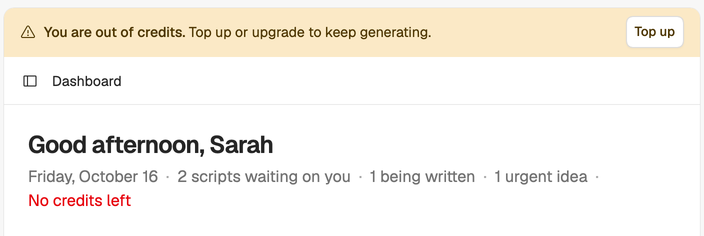
A banner at the top of the app says You are out of credits. The menu under your name says No credits left.
Where you tried to use AI, you may also see one of these:
- Not enough credits to run this step. A script stage or an import needs more credits than the workspace has left.
- Writing and polishing the draft needs 12 credits. The draft writes and polishes in one go, so it only starts with 12 credits in the workspace. Add credits, then run the draft again.
- You are out of credits, so the assistant could not answer. This one shows in the assistant panel.
- An Out of credits dialog with the plans and packs you can buy.
When credits run low (below 20% of your plan’s monthly credits), a banner says how many are left, so you can top up before a long step.
How to get more
Only the workspace owner can buy credits or change the plan. If you’re a member, the banner says to ask the owner.
- On the trial: choose Upgrade and pick a plan. Top-ups aren’t available during the trial, and the plan’s monthly credits replace what’s left of the trial’s. See How the trial works.
- On a paid plan: choose Top up to buy a top-up, or wait for your plan credits to reset. Billing shows the date.
- Running out every month? A bigger plan may cost less than regular top-ups. See Choose a plan.
If a payment is being retried, top-ups are paused until it goes through. See Change or cancel your plan.
What still works without credits
- Opening, reading and copying your scripts and ideas.
- Editing scripts by hand.
- Capturing ideas and editing your Creator DNA.
- The teleprompter and share links.
What costs what? The full table is in How credits work.