
Invitations go out from Members in workspace settings. If you can’t send one, or the person can’t get in, it’s usually one of the reasons below. For the normal steps, see Invite your team.
You can’t send the invite
- You don’t see Workspace settings. Only the workspace owner can open them and invite people. Ask the owner to invite them, or to transfer ownership to you.
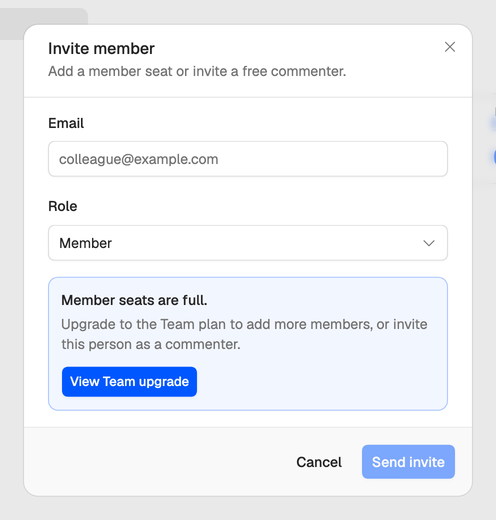
- The seats are full. Creator and the trial have 1 seat, the owner’s. Team has 4. Upgrade with View Team upgrade, remove someone, or change a Member to a Commenter. A Commenter is free, but can’t open scripts yet. See Roles and seats.
- There’s no Invite button. The workspace is read-only, because its plan or trial has ended. Invite comes back once it has a plan again. See My workspace is read-only.
- “This person is already a member.” They’re in the workspace already. Look for them in the members list.
- “An invitation is already pending for this email.” Resend or revoke the one under Invitations instead of sending another.
When the seats are full, the invite dialog says so as soon as you pick Member, and Send invite stays greyed out.
They didn’t get it
Check the invitation’s status under Invitations on the Members page, then open the menu at the end of its row.
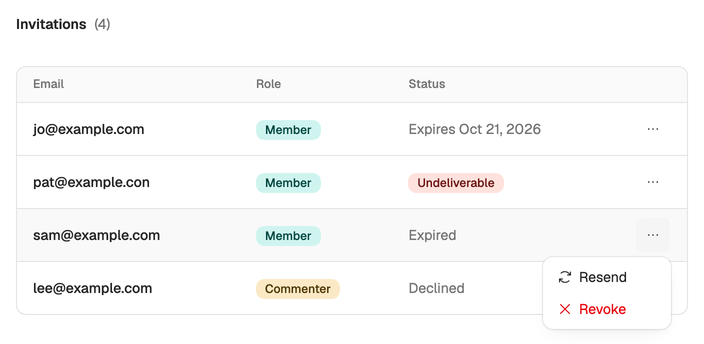
- Expires and a date: it was sent. Ask them to check their spam folder, or choose Resend.
- Undeliverable: the email bounced. Check the address for typos, choose Revoke, and invite the right address. It can’t be resent.
- Expired: invitations last 7 days. Choose Resend to send a new link.
- Declined: they turned it down. Choose Resend if they’ve changed their mind.
They can’t join
If the link itself no longer works, the page says Invitation Unavailable: the invitation has expired, was revoked, or was resent, which replaces the old link. Resend it and ask them to use the newest email. If they’re signed in with another address, the page says Use the invited account: they need to sign in with the address you invited, or you invite the one they use.
When accepting fails, the page says Could not join this team and why.
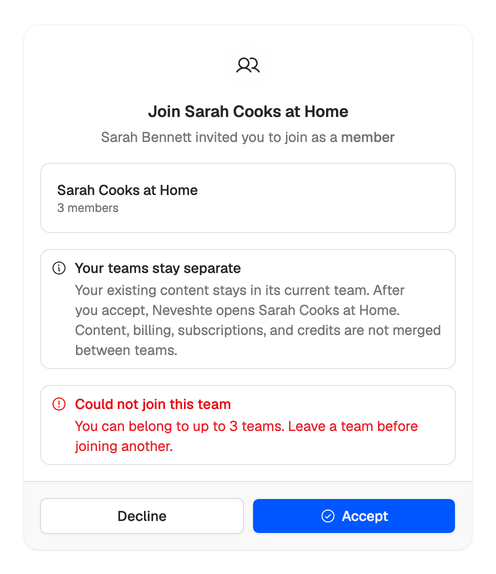
- “You can belong to up to 3 teams.” They’re in three workspaces already, and their own counts. To make room they can delete a workspace they own, or ask the owner of one they were invited to to remove them.
- “You have reached the seat limit for your plan.” An invitation only takes a seat when it’s accepted, and the last one went first. Free a seat or upgrade, then ask them to open the link again.
- “This workspace is read-only.” Your plan or trial has ended. Choose a plan, then ask them to try again.
If they join and see This workspace isn’t ready yet, you haven’t finished your own first login. Once you do, they can work in it.
Something else? Email support@neveshte.com with the workspace name and the address you invited.