
The script editor saves as you type. When a save doesn’t go through, it tells you in one of two places:
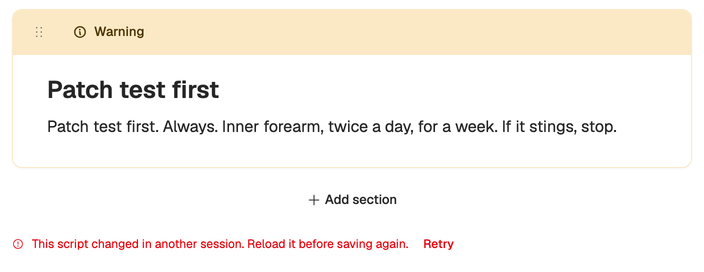
- A change to the sections shows a red message with Retry under the last section.
- A change to the title or the header (status, publish date, channel, profile, voice or tags) shows Not saved with Retry in Save status, on the rail’s Details tab.
Here’s what each one means.
Changed in another session
This script changed in another session. Reload it before saving again.
Someone else saved the script after you opened it, or you have it open in another tab or on another device. So that you don’t overwrite that version, the editor stops saving your section changes, and Retry won’t get past it.
- Copy anything you typed since the last save.
- Reload the page to get the latest version.
- Paste your changes back in.
On Team, agree who’s editing a script at a time to avoid this.
Other save errors
Any other red message under the sections, or Not saved in Details, usually means the connection dropped. Press Retry. If it keeps failing, check your internet connection, copy your latest changes somewhere safe and reload the page.
If the workspace is read-only (the trial ended or a payment failed), the editor stops taking changes. You can still open, read and copy your scripts, and read them from the teleprompter. See My workspace is read-only.
In the idea editor
The idea editor saves as you type too. If its rail shows Could not save, your change is kept and goes out with your next edit, so type again to retry, or copy your text and reload.
Its AI rewrite of a selection can show messages of its own:
- AI rewrite timed out. Try again. Run it again, or select a shorter passage.
- Could not apply the rewrite because the original selection changed. You edited the text while the rewrite ran. Select it again and rerun.
- Too Many Attempts. AI requests are limited to 60 an hour for each person in a workspace. Wait a while and try again.
If you’re out of credits, the rewrite says so. See Out of credits.
Lost something? Email support@neveshte.com with the script’s title and roughly when it happened.