
Importing from a video link reads a public YouTube video and turns it into a profile, a voice, a template or ideas. If the import doesn’t go through, it’s usually the link itself. For how importing works, see Learn from any public video.
Check the link
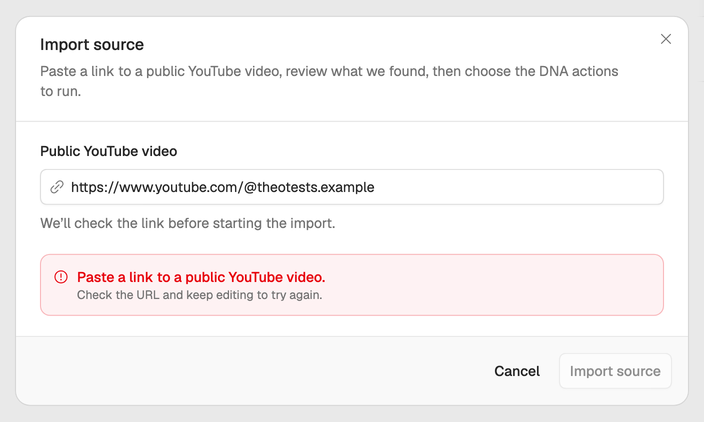
Neveshte checks the link as soon as you paste it. Paste a link to a public YouTube video. under the field means it isn’t a link to one video:
- It must be one YouTube video or Short. Links to a channel or a playlist don’t work. A link to a video inside a playlist does.
- It must be public. Private videos can’t be read.
- It must be 30 minutes or shorter. Longer videos can’t be imported yet.
Invalid YouTube video URL. or Invalid YouTube Shorts URL. means the video’s ID in the link is cut short or mistyped. Copy the link again from the video’s Share button on YouTube.
When the video can’t be read
A link can pass the check and still fail once the import starts, when Neveshte fetches the video. The bell at the bottom of the sidebar then shows Source preparation failed, and an import started from a DNA page says We could not read this source. Open the source details to try again. The start of the notification’s message tells you why:
- This video is longer than we support right now. Use a YouTube video that is 30 minutes or shorter. Pick a shorter video.
- We could not fetch that source right now. Check the URL or try again shortly. YouTube didn’t answer, or the video couldn’t be read.
For the second one:
- Open the link in your browser to make sure the video plays.
- Wait a few minutes, then open the source on the Sources page with Details and choose Retry source fetch.
- If it still fails, try another video with captions. Imports work best when the video has a transcript.
If the video was read but one action failed, the action says so in the source’s details (for example We could not draft a voice from this source. Try again.) and offers Retry.
Your credits
Each action costs 5 credits when it runs. Reading the video is free, so a link that can’t be read costs nothing, and an action that fails is refunded automatically. See How credits work.
Same link keeps failing? Email support@neveshte.com with the link and what you were importing.