
Any public YouTube video or Short can teach Neveshte something: how its creator talks, how the video is built or what it could spark for your channel. You paste the link, choose what to take from it and review the result before you use it. It’s handy without a channel of your own, or when you want a format you haven’t made before. Only the workspace owner can import.
Import from a link
- Open Sources under DNA and choose Import source, or select the + beside Sources in the sidebar.
- Paste a link to a public YouTube video or Short under Public YouTube video. It must be 30 minutes or shorter. Neveshte checks the link and shows the video it found.
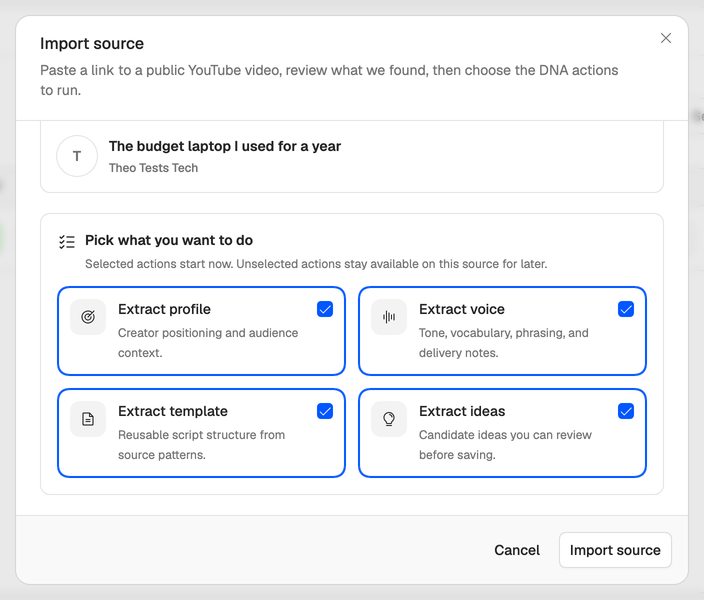
- Under Pick what you want to do, keep the actions you want. All of them start selected:
- Extract profile. Who the video is for and how it makes its points.
- Extract voice. How the speaker talks: tone, vocabulary, phrasing and delivery.
- Extract template. The video’s structure, section by section.
- Extract ideas. Video ideas it suggests, for you to review before you save them.
- Choose Import source. The bell at the bottom of the sidebar tells you when each action is done.
Each action costs 5 credits, so a profile, a voice and a template from one video cost 15. An action that fails is refunded. The actions you leave out stay on the source, and you can run them later.
Review what it made
Open the source on the Sources page with Details. Each action shows its result:
- Open profile, Open voice and Open template take you to what it made.
- For ideas, tick the ones you like under Idea candidates and choose Save selected.
- Run starts an action you didn’t pick at first, and Replace runs a finished one again. Each run costs 5 credits.
You don’t have to start from Sources. Import profile on Profiles, Import voice on Voices, Import template on Templates and Extract on Ideas each do the same import for that one thing.
Everything imported is a draft you can edit. A voice learned from another creator is a good start, but make it yours: change the speaking speed, swap in phrases you’d actually say and add the ones to avoid. See Tune your voice and Edit your creator profile.
A link won’t import? Check it’s one public video, 30 minutes or shorter, then see A video link won’t import.