
Credits pay for the AI steps in Neveshte. Reading, editing by hand and recording cost nothing, so credits only go down when the app writes, researches or imports something for you. Every credit belongs to the workspace, so on Team the whole team spends from one pool.
What each step costs
| Action | Credits |
|---|---|
| Brief | 1 |
| Research (optional) | 2 |
| Outline | 2 |
| Write | 8 |
| Polish | 4 |
| Assistant message | 1 |
| AI rewrite in the idea editor | 1 |
| Generate ideas (up to five) | 2 |
| Import from a video (per profile, voice, template or idea set) | 5 |
| Channel setup | 0 |
A full script costs 17 credits with research and 15 without. An assistant message that only answers a question about your script’s facts, or moves a section, gives its credit back.
Writing and polishing run together, so the draft only starts when the workspace has at least 12 credits.
When credits reset
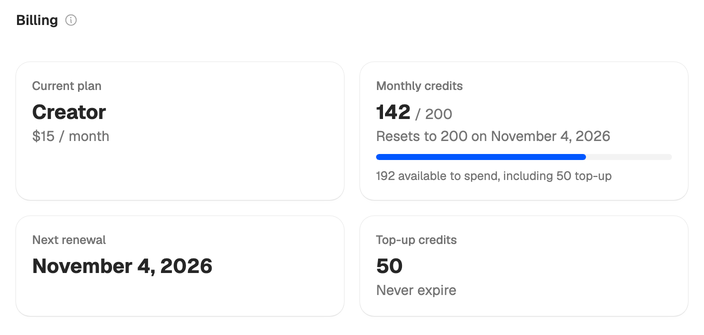
Your plan’s credits reset to the plan’s full amount once a month, on the day your plan renews. The Billing page shows the date. On a yearly plan they reset every month too, on the day of the month you subscribed. Unused plan credits don’t roll over.
Top-up credits work differently. They’re kept when your plan credits reset, and the app spends your plan credits first.
The trial’s 100 credits are a one-time grant. Picking a plan replaces them with the plan’s monthly credits.
When a step fails
If an AI step fails or stops responding, its credits are refunded automatically, so you only pay for steps that finish. Running a stage again, or regenerating one, spends its credits again, and the app tells you before it does.
Checking your balance
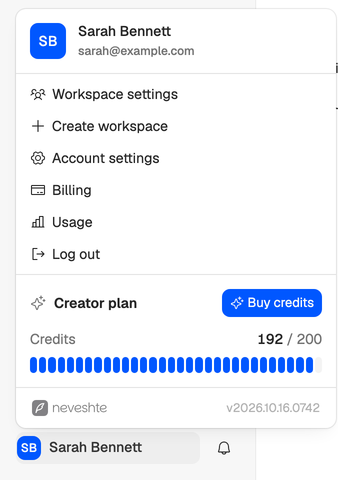
The menu under your name shows how many credits the workspace has left, for everyone in it.
The workspace owner sees more on Billing in the workspace settings: plan credits and top-up credits apart, and when the plan credits reset.
To see where the credits went, the owner opens Usage. See Invoices and usage.
Ran out? See Out of credits.