
Two pages in the workspace settings keep track of money and credits: Invoices for what you’ve paid, and Usage for how credits are spent. Only the workspace owner can open them.
Invoices
Open Invoices in your workspace settings to see your plan’s invoices, newest first. Each one shows the plan, the period it covers, when it was paid and the amount. The two icons beside it are:
- View invoice, which opens the invoice in a new tab.
- Download PDF, which saves a copy for your records.
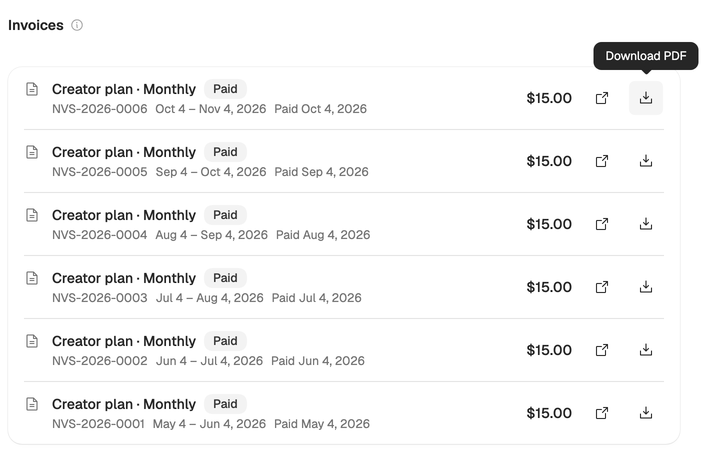
Each invoice shows its status:
| Status | Meaning |
|---|---|
| Paid | The payment went through. |
| Due | The invoice is waiting to be paid. Pay opens it to pay now. |
| Draft | The invoice isn’t final yet. |
| Void | The invoice was cancelled and isn’t owed. |
| Payment failed | The charge didn’t go through. Pay opens it to try again. |
If a payment failed, update your card too. See Change or cancel your plan. Older invoices load with Show more.
Usage
Open Usage in your workspace settings. The top shows the credits used in the current cycle and how many are left. Under Credit usage:
- By action shows what the credits went on, such as full scripts, polish, outlines and research, with how many times each ran.
- By member shows how many credits each person used. It’s part of the Team plan.
- The menu beside it switches between the current cycle and past months.
- Export CSV downloads what you’re looking at, for a spreadsheet or your accounts.
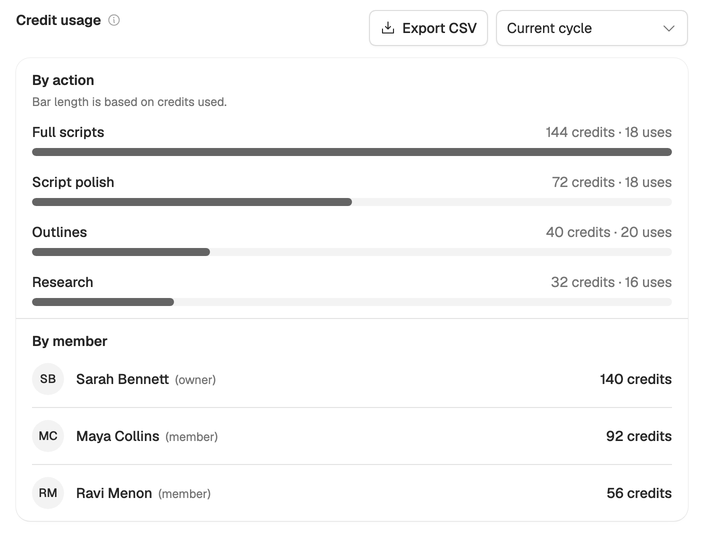
Usage helps you decide whether your plan fits. If you top up most months, Team may cost less. See Choose a plan and How credits work.
Not the owner? Ask the workspace owner for invoices. Ownership can be transferred from Members in the workspace settings.