
Every new workspace starts with a 14-day trial. You get 100 credits and no card is needed, so you can set up your channel and write real scripts before you decide anything.
What’s included
The trial works like the Creator plan:
- 14 days, counted from the moment the workspace is created.
- 100 credits, once. That’s about five researched scripts (one costs 17 credits).
- One seat, so one person writes in the workspace.
- Channel setup, which is free on any plan.
Top-ups aren’t available during the trial. If you use all 100 credits early, pick a plan to keep generating. See How credits work for what each step costs.
Before it ends
The days you have left show in a card at the bottom of the sidebar. The workspace owner can choose Upgrade now there to pick a plan.
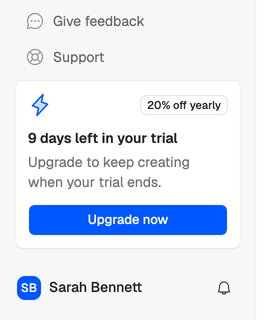
In the last 3 days, a banner at the top of the app also says when the trial ends.
When it ends
The workspace becomes read-only. Your scripts, ideas and Creator DNA stay where they are, and you can still open, read and copy them. Creating, editing, imports, AI steps, invitations and share links stop working until the owner picks a plan. See My workspace is read-only.
Picking a plan
Only the workspace owner can pick a plan.
- Open Billing in your workspace settings, or choose Upgrade now in the sidebar card.
- Choose Monthly or Annual billing. Annual gives you 2 months free.
- Choose Upgrade on Creator or Team, and pay at checkout.
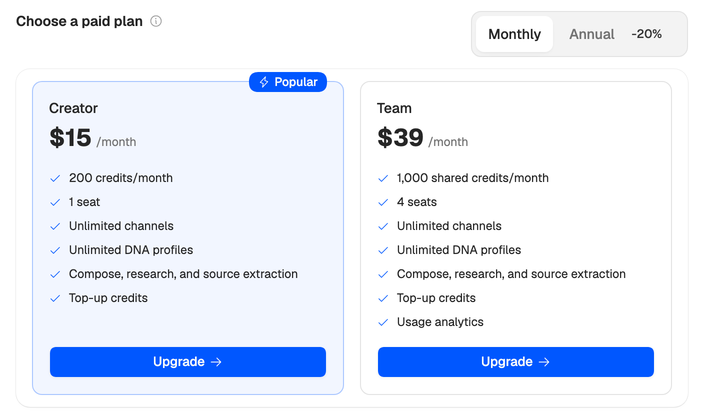
You can write again as soon as the payment goes through. The plan’s monthly credits replace what’s left of your trial credits, so unused trial credits don’t carry over.
Not sure which plan? See Choose a plan, or compare them on the pricing page.