
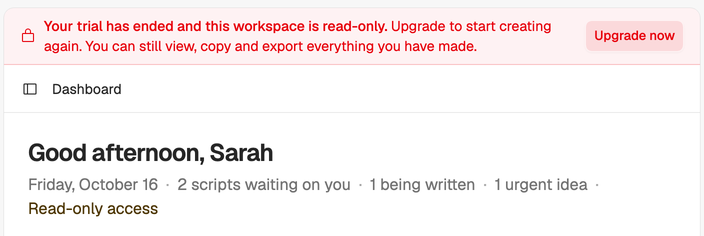
A read-only workspace keeps everything you’ve made but stops new work until the workspace has paid access again. Nothing is deleted, and you can pick up where you left off.
Why it happens
A workspace becomes read-only when:
- The trial ended without a plan being picked.
- A payment failed and still hadn’t gone through after 3 days of retrying.
- The subscription ended, when a cancelled plan reached the end of its paid period.
A red banner at the top of the app says which one it is.
What still works
- Opening, reading and copying your scripts, ideas and Creator DNA.
- Billing, so the owner can fix it.
- Deleting the workspace.
What’s paused
- Creating, editing and deleting scripts, ideas and Creator DNA.
- Comments, imports from videos and AI steps: compose, the assistant and idea generation.
- Inviting members and changing roles.
- Share links. Anyone opening one sees that the shared content is temporarily unavailable, and the link works again once access is back.
How to fix it
Only the workspace owner can restore access. If you’re a member, ask the owner.
- The trial ended or the subscription ended: choose the banner’s button and pick a plan, or pick one under Upgrade to keep creating on Billing.
- A payment failed: choose Update payment method on Billing, or the banner’s button, and update your card.
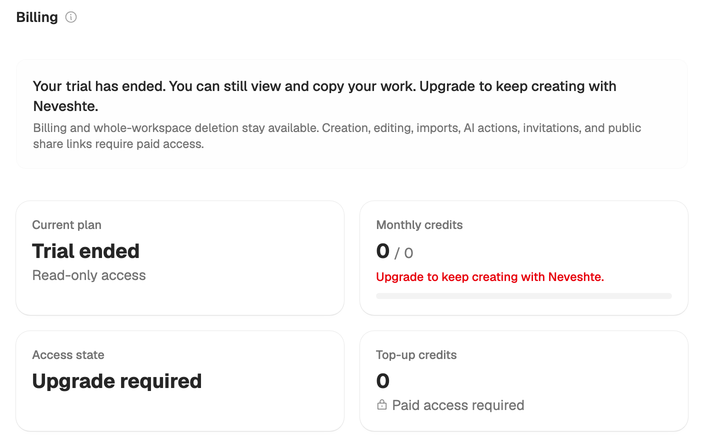
Access comes back as soon as the payment goes through. See Choose a plan and Change or cancel your plan.
Seeing Workspace Suspended instead? That page replaces the whole workspace, but your data is kept. The owner can choose Upgrade plan to reactivate it, or delete the workspace. If you think it’s a mistake, email support@neveshte.com with the workspace name.