
Now and then a step in compose doesn’t finish: an AI model is busy, a source doesn’t load or the connection drops. Nothing you entered is lost when that happens, and you don’t pay for a step that didn’t finish.
When a step fails
Each step already tries twice on its own before it gives up. When it does, the step bar marks it Needs attention, and the step says it stopped (for example Research stopped), gives the reason and lists what was kept.
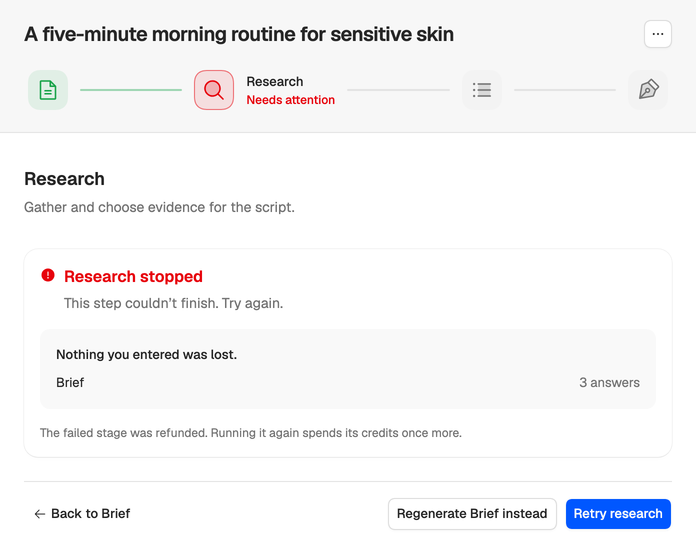
- Press the retry button, named after the step (such as Retry research). It runs the step again from where it stopped, keeping everything before it.
- If it fails again, wait a minute and try once more. Busy moments usually pass quickly.
- Still failing? Regenerate with the earlier step’s name, such as Regenerate Brief instead, reruns the step before it and everything after.
The failed step’s credits are refunded automatically. Running it again spends them once more.
The reason tells you what to do:
- This step couldn’t finish. Try again. Something went wrong on our side. Retry.
- Not enough credits to run this step. or Writing and polishing the draft needs 12 credits. Add credits first. See Out of credits.
When a step seems stuck
A step that stops reporting progress is stopped for you after its time limit, refunded and marked as failed, so you can retry it. A step that’s still waiting to start after about 20 minutes fails with This step never started. Try again.
If the top of compose says Reconnecting to compose or Progress may be out of date, the live connection dropped but the work carries on. Choose Refresh beside the message, or Refresh state in the menu at the top right of compose, to see where it really is.
You can close the tab
Compose runs on our servers, not in your browser. You can close the tab or move on to something else. The bell in the sidebar lists compose runs that finished or failed, and ones that have been waiting on you for half an hour.
If it keeps failing
Email support@neveshte.com, or use Give feedback in the sidebar, and include:
- The script’s title and which step failed.
- Roughly when it happened.
- A screenshot of the message, if you have one.
Starting over? Regenerating a step that already finished spends its credits again. See How credits work.