
Channel setup depends on YouTube answering and your videos having transcripts. When one of those doesn’t happen, here’s what you’ll see and what to do. For how setup works, see Set up your channel.
The channel won’t add
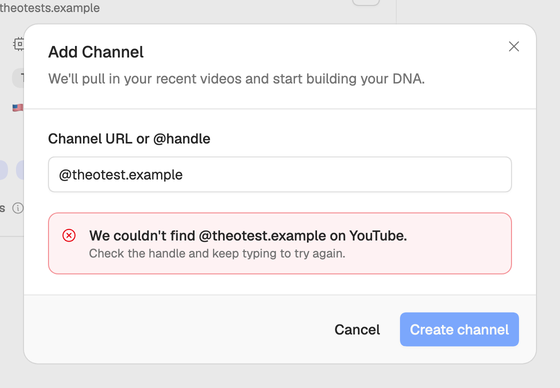
The Add Channel window looks the channel up as you type and tells you when something’s wrong:
- We couldn’t find @yourhandle on YouTube. Check the URL or @handle. Copy it straight from the channel’s page on YouTube, and make sure the channel is public. The lookup tries again as you keep typing.
- This channel is already in your workspace. Open it from the Channels page.
- YouTube lookup is rate-limited right now. Try again shortly. YouTube is limiting lookups for now. Wait a while and try again.
Only YouTube channels can be added, and only the workspace owner can add one. If you don’t see Add Channel at all, you aren’t this workspace’s owner.
A setup step fails
The failed step turns red and offers two choices:
- Retry runs setup again from that step. Setup is free, so retrying costs nothing.
- Skip setup ends setup with what it has drafted so far. You can add a profile, a voice and templates by hand from the DNA pages afterwards.
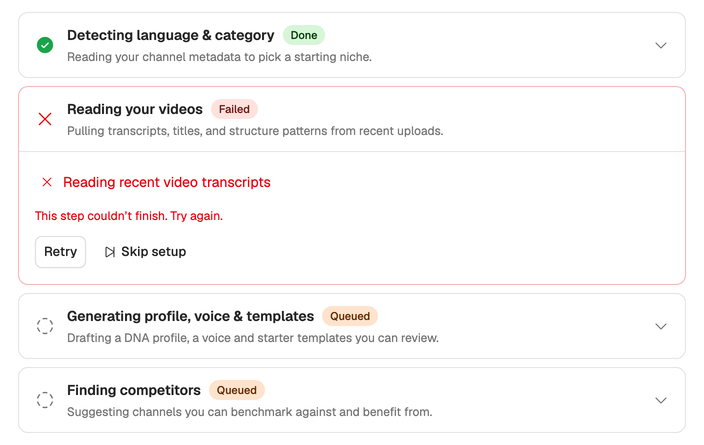
If retrying fails again, wait a while before the next try. The step usually fails because YouTube or a service setup relies on didn’t answer in time.
The profile is thin or the voice is empty
Setup learns your voice from transcripts and from the videos it watches. When your videos have no transcripts, Reading your videos says Transcripts were unavailable and the profile is drafted from titles, descriptions and channel details instead. If no video could be watched either, the voice card says No voice yet.
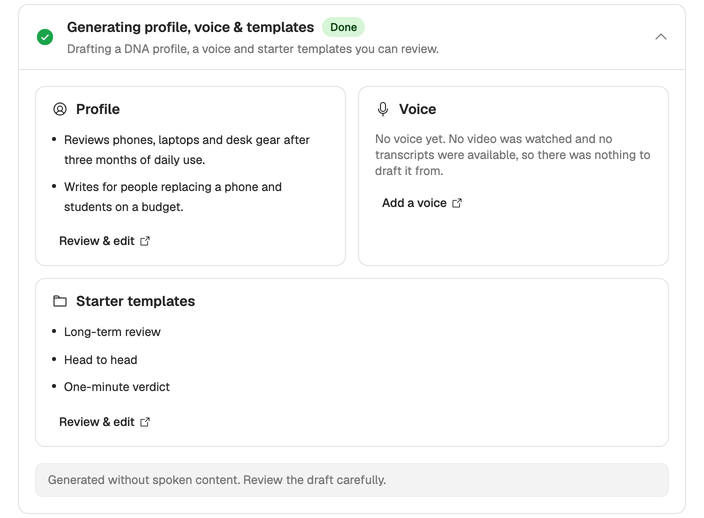
You can:
- Choose Add a voice and write it yourself. See Tune your voice.
- Learn a voice from any public video that has captions, yours or one by a creator you admire.
- Edit the profile with what setup couldn’t know. See Edit your creator profile.
Competitor suggestions are missing
YouTube limits how many lookups Neveshte can make each day. When it runs out, Finding competitors says YouTube lookup hit a quota limit. Some suggestions may be missing. If the step fails, choose Finish without competitors.
Either way, you can add competitors yourself: on the channel’s card on the Channels page, select the + beside Competitors. A channel can have up to five.
Still stuck? Email support@neveshte.com with your channel’s URL.