
You can belong to up to three workspaces, for example your own and a client’s. Each one has its own Creator DNA, ideas, scripts, members, plan and credits, and nothing is shared between them.
Switch
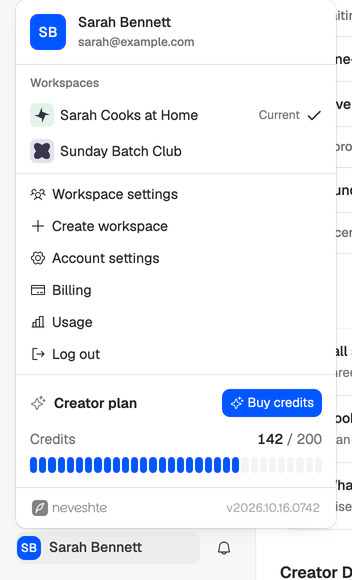
Open the menu under your name at the bottom of the sidebar. When you belong to more than one workspace, it lists them under Workspaces, with Current next to the one you’re in. Pick another to switch, and you land on its dashboard.
Create a new workspace
Choose Create workspace in the same menu, give it a name and choose Create workspace. You land on its dashboard.
The menu only offers it when you own the workspace you’re in and it has an active paid plan. A trial, a cancelled plan or a failed payment doesn’t count. You can belong to three workspaces at most, counting your own and the ones you were invited to.
Every new workspace starts without a channel, with its own 14-day trial and 100 credits, and then needs its own plan. Add a channel from Channels to build its Creator DNA. See How the trial works and Manage your channels.
Do you need one workspace per channel? Not usually. A workspace can hold as many channels as you like, each with its own profile, voice and templates. Use a separate workspace when the billing or the people are different.
Leave a workspace
Leave workspace sits in workspace settings, which only the owner can open, so for now a member can’t leave on their own. Ask the owner to remove you from Members. Your ideas and scripts stay with the workspace, and you can only rejoin with a new invitation.
Owners can’t leave. Transfer ownership to another member first (see Roles and seats), then ask the new owner to remove you. Or delete the workspace, if you belong to another one (see Workspace settings and tags).