
You can delete your account yourself from your account settings. It takes effect right away, so read what happens to your workspaces and your writing first.
Before you delete
You can’t delete your account while you own a workspace, and every account owns at least one: the workspace made for you when you signed up. If you try, the app names the workspaces still in the way.
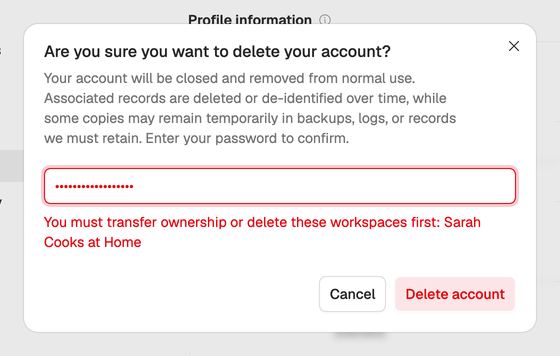
For each one, either:
- Transfer ownership to another member from Members in its workspace settings. You become a Member, and deleting your account then takes you out. See Roles and seats.
- Delete the workspace from its General settings. That’s only possible while you belong to another workspace, and once any plan on it has ended. The workspace still counts as yours during its 24-hour grace period, until it’s deleted. See Workspace settings and tags.
If you only want to stop paying, you don’t need to delete anything. See Change or cancel your plan.
Delete your account
- Open Account settings from the menu under your name in the sidebar.
- Under Danger zone at the bottom of Profile, choose Delete account.
- Enter your password. If you only sign in with Google, choose Confirm with Google instead.
- Choose Delete account.
What happens next
- Your account is closed right away. You’re signed out on every device and taken out of every workspace you belonged to.
- Your personal data is then deleted or de-identified over time, as the privacy policy explains.
- Scripts and ideas you wrote in other people’s workspaces stay there, without your name on them. They belong to that workspace.
Alone in your only workspace? Then there’s nobody to hand it to and no other workspace to keep, so the app can’t close your account yet. Email privacy@neveshte.com from your account’s address and we’ll do it for you.