
A long list of ideas is only useful if you can find the right one. Ideas sorts itself into a timeline, and three things on each idea help you narrow it down: its status, its urgency and its tags.
The timeline
The Open tab lists every idea you haven’t archived, in groups:
- Urgent. Ideas whose urgency window is still running, however old they are.
- This week. Ideas created since the start of the week.
- This month. Ideas created earlier this month.
- Older. Everything before that. Choose Load older to see further back.
Each row shows the idea’s status, when it was created or last updated, and up to three of its tags. An idea a script was made from also shows Converted, which opens the script.
Archived holds the ideas you’ve archived, and Suggestions holds generated ideas waiting for someone to add or dismiss them. See Generate or extract ideas.
To find one idea, search the titles with the search field, or pick a tag from Tags. Either one swaps the groups for a single list of results.
Status
Each idea has a status: New, Developing, Ready, Scripted or Archived. Use them to see at a glance which ideas are worth writing next. Change it from the Status field at the top of the idea.
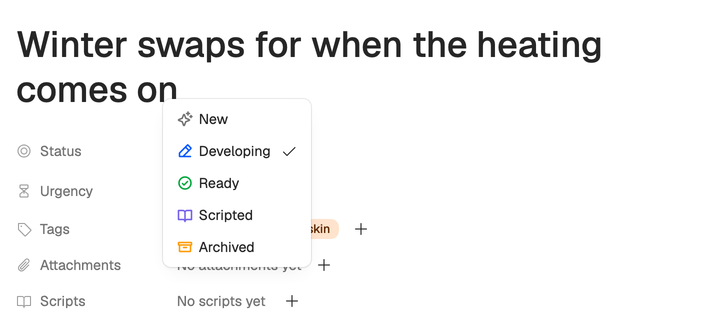
Ideas start as New, including suggestions you add. Making a script from an idea doesn’t change its status, so set it to Scripted yourself once it’s written. Scripted ideas stay on the Open tab.
Urgency
Some ideas have a shelf life, such as a news story, a launch or a trend. Set Urgency to 24 hours, 7 days or 30 days, and the idea sits in Urgent at the top of the list until that time runs out. Then it drops back into the group its creation date puts it in. Leave it on Not urgent for evergreen ideas.
Tags
Tags group ideas by series, theme or format. New workspaces start with five: Research, Tutorial, Opinion, News and Evergreen. Add them with the + in an idea’s Tags field. The workspace owner can also create a tag there with Create new tag.
The owner manages the tag list (names up to 50 characters, each with a color) from Tags in workspace settings. See Workspace settings.
Archive and restore
Archive ideas you’ve decided against, so they leave the list without being deleted. Open the menu at the end of the idea’s row and choose Archive, or set its status to Archived. Archived ideas wait on the Archived tab, where the same menu offers Restore, which brings an idea back as New.
Delete in that menu removes an idea for good, so archive anything you might want later.